
Combining Offers with Other Discounts
Each campaign sets whether its offers can be combined with other discounts in your store. Because Quikly offers are standard Shopify discount codes, this uses Shopify’s own combination rules.
Set Combinations in Quikly
Section titled “Set Combinations in Quikly”-
Navigate to Build > Offers in your Quikly campaign.
-
Under Global settings > Combinations, check each type of discount the offer can be combined with:
- Product discounts
- Order discounts
- Shipping discounts
-
Save the offer.
All three are unchecked by default, so a Quikly offer won’t stack with anything unless you choose to allow it. The setting applies to every tier in the campaign.
In Shopify, the same choices appear under Combinations on each of the campaign’s discounts:
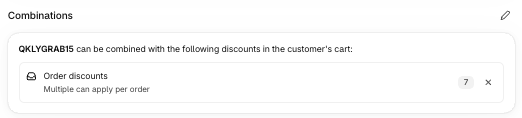
Shopify only lets two discounts stack when both of them allow it. If a shopper can’t use a Quikly code together with another code, check the other discount’s combinations too.
Affiliate and Influencer Codes
Section titled “Affiliate and Influencer Codes”Most affiliate apps (such as Refersion and UpPromote) create standard Shopify discount codes, so they run side by side with Quikly.
To let shoppers use a Quikly offer and an affiliate code on the same order:
- In Quikly, allow the offer to combine with the affiliate code’s discount type (usually Order discounts or Product discounts).
- In Shopify or your affiliate app, make sure the affiliate code also allows combining with that type.
If you’d rather protect your margin, leave combinations off and shoppers will have to choose one code or the other.
Running a Campaign for a Partner
Section titled “Running a Campaign for a Partner”Affiliates and influencers can promote a Quikly offer of their own. Create a dedicated campaign for each partner:
- Create a campaign for the partner (you can duplicate an existing campaign to start).
- In the campaign’s Audience Targeting settings, limit the campaign to visitors from an activation link, so only shoppers who arrive through the partner’s link see it. See Campaign Visibility Controls.
- Share that link with the partner.
Give each partner their own campaign. Each campaign gets its own new discount codes (a partner’s existing affiliate code can’t be reused as a Quikly code), so orders are credited to the right campaign even when a shopper types the code in directly. The campaign’s results show that partner’s performance, and commissions stay in your affiliate platform.
Related Tutorials
Section titled “Related Tutorials”- Configuring Offers — Every offer setting in Quikly
- Quikly Discounts in Shopify — How Quikly offers appear in your Shopify admin
- Campaign Visibility Controls — Limit a campaign to visitors from a specific link
- Identifying Quikly Orders — How Quikly attributes orders to a campaign