
Test Offer Codes Before Launch
If you want to confirm your discount codes work — and see how they combine with your other offers — before a campaign goes live, you can activate the codes ahead of the launch date.
Activate Codes Before Launch
Section titled “Activate Codes Before Launch”-
On the campaign overview screen, find the Timing card and click Edit.
-
Under Timing > Starts, check the box next to Activate discount codes before campaign launches.
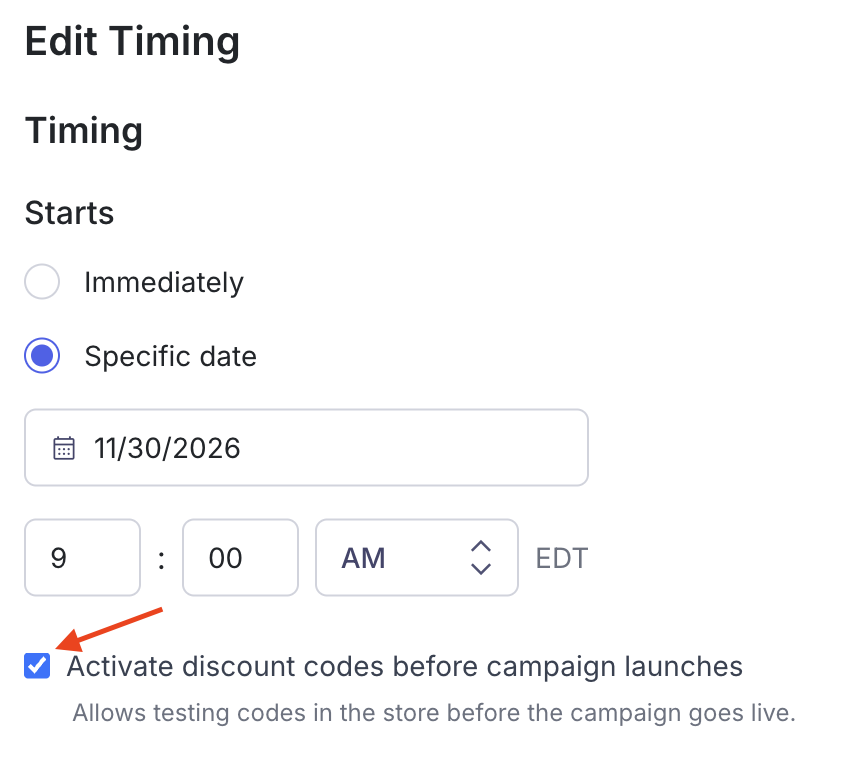
- Save the change. Your discount codes are now active in the store, so you can test them before the campaign’s start date.
This lets you verify that a code’s configuration is correct and check how it combines with your other existing offers.
Related Tutorials
Section titled “Related Tutorials”- Configuring Offers — Set which products each discount applies to
- Managing a Live Campaign
- How to Duplicate a Campaign